
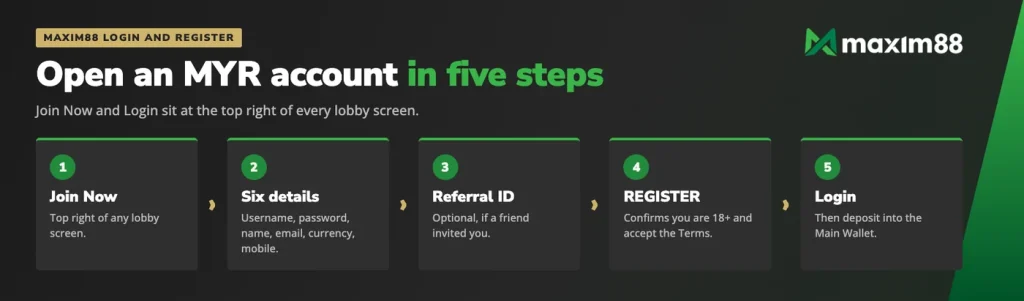
Login and Join Now sit together at the top right of every screen in our lobby, so a Maxim88 login is never more than one tap away. Signing in takes the username and password you picked yourself, and Telegram and WhatsApp are offered on the same panel as alternatives. If you have not joined us yet, Join Now opens a short form: six details, a currency fixed to Malaysian Ringgit, and one optional field for a friend’s referral ID. Opening the account is free, and you must be 18 or over.
Maxim88 login: getting into your account
The sign-in entry is the same everywhere in our MYR lobby. Whether you arrive on the casino page, the sportsbook or the 4D board, the Login button is in the top right corner, next to Join Now.
Your account is a single account across every product we run, from slots and fishing to live tables and sports. There is no separate sign-in for each vertical. What changes after login is only where your money sits, because funds move between the Main Wallet and a provider wallet by transfer.
Username and password
The username and password you set during registration are the only pair that opens the account, so write the username down the way you typed it. Keep the password to yourself: we will never ask you for it on Live Chat, and no one on our team needs it to help you.
If you cannot get in, our Customer Service team on Live Chat is the route back. They are available around the clock and can help you restore access to the account.
Maxim88 Malaysia login on a phone
A Maxim88 Malaysia login works the same on a phone browser as on a desktop: the same username, the same password, the same wallets and the same promotion history. Nothing is duplicated and nothing is left behind when you switch device, because the account lives with us rather than with the browser you happen to be using.
Log in with Telegram or WhatsApp
Telegram and WhatsApp both appear as sign-in options on the login and registration panel. They are an alternative to typing a username and password, which is useful if you sign in several times a day on a phone. The account itself is unchanged: the same MYR balance, the same wallets, the same promotions.
Maxim88 register: the Join Now form
Registration is one screen. We ask for six details, one optional referral field and a confirmation that you are of age, and that is the whole process. There is no fee for opening the account and no deposit required before you can see the lobby from the inside.
The fields we ask for
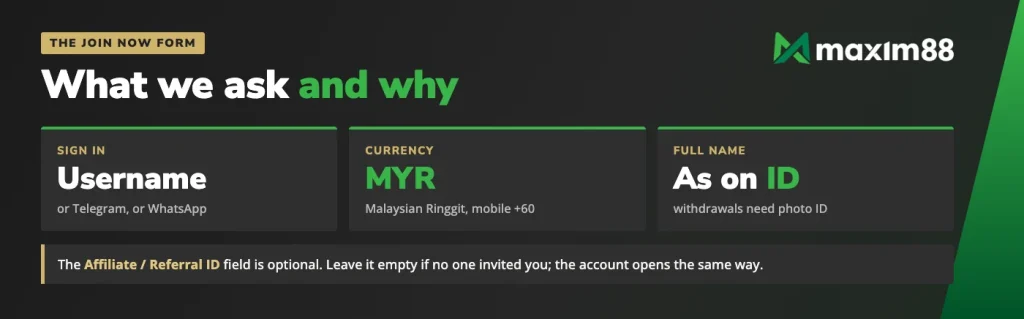
Your Username and Password are chosen by you and become your sign-in pair. Full Name should be your name as it appears on your identity document, because withdrawals are released against a copy of that document. Email Address is where account correspondence goes.
The Currency field is set to Malaysian Ringgit, MYR, for players in Malaysia, and it determines the currency of every figure you will see afterwards: deposits, bonuses, rebates and withdrawals. Your Mobile number is entered after the +60 prefix.
| Detail | Maxim88 |
|---|---|
| Sign in | Username and password, or Telegram, or WhatsApp |
| Join Now fields | Username, Password, Full Name, Email Address, Mobile |
| Currency | Malaysian Ringgit, MYR |
| Mobile prefix | +60 |
| Referral | Optional Affiliate / Referral ID |
| Minimum age | 18 |
| Help | Live Chat, 24/7 |
The 18+ confirmation
Pressing REGISTER is a declaration as well as a submission. By pressing it you acknowledge that you are above 18 years old and that you have read and accepted our Terms and Conditions. Those terms also cover the one-account rule: a single account per person, which matters because duplicate accounts forfeit bonuses.
Why your full name matters later
The name on the form is the name we verify when you ask for money back. Withdrawals are released once you provide a copy of valid photographic identification, and they return in the currency you deposited in, which for our Malaysian members means MYR. A name that matches your ID keeps that step short. Identity verification is also compulsory before a VIP upgrade, so the detail you type on day one is the detail that saves time on the day a tier change is due.
- Open the form. Press Join Now at the top right of any lobby screen.
- Fill in the six details. Username, Password, Full Name, Email Address, Currency set to Malaysian Ringgit and your Mobile number with the +60 prefix.
- Add a referral ID. If a friend invited you, their ID goes in the last field; leave it empty if no one did.
- Press REGISTER. That press confirms you are over 18 and that you accept the Terms and Conditions.
- Log in and fund the account. Sign in with your new details, then make your first deposit into the Main Wallet.
Nothing in that sequence costs anything. The account is created free, and the first money that moves is your own deposit.
The Affiliate / Referral ID field
The last field on the form is Affiliate / Referral ID, and it is optional. If a friend sent you an invite link or an ID, that is where it goes; if no one invited you, leave the field blank and the registration completes exactly the same way. It belongs to the form, so fill it in while you are registering rather than afterwards. What the member who invited you can claim, and what VIP referrers add, is covered on the page about how referrals work.
After your first login
Deposits land in your Main Wallet. That wallet holds the money but does not play anything, so the next step is the Transfer page, which moves funds from the Main Wallet into the wallet of the provider you want to play: a slots provider, a live casino studio, the sportsbook and so on. Move money back the same way when you want to switch product.
The Transfer page is also where a promotion is claimed. Pick the offer from the Promo Code dropdown as you make the transfer, and the bonus attaches to that provider wallet. Only one active promotion runs per provider wallet at a time, which means no further transfer into the same provider until the turnover is completed or the promotion is cancelled.
Keep in mind
A welcome bonus is only for members who have not joined any Maxim88 promotion before. So choose your first promotion deliberately, before you claim anything else.
Signing in on the phone follows the same pattern as the browser, including on the Android and iOS app, where the same username and password open the same wallets.
Keeping your account safe
One account per person is the rule that protects everything else, and duplicate accounts lose their bonuses, so register once and keep using the same login. Your password stays with you alone. We never ask for it, and no legitimate request for it will ever reach you from us.
Reach us only through Live Chat or the Telegram channel shown on our Contact screen. Those two channels are staffed 24/7 and are the only places where you are speaking to our Customer Service team. Anyone approaching you elsewhere with account offers or password requests is not us.
Verification is part of the account rather than an obstacle to it. Identity verification is compulsory before a VIP upgrade, and a withdrawal is released on a copy of valid photographic identification, with funds going back in the currency you deposited in. Reading our deposit and withdrawal rules before your first cash-out means no surprises at the cashier.
A username, a password and a mobile number are all it takes to open an account in MYR.
FAQ
How do I log in to Maxim88?
Press Login at the top right of any lobby screen and enter the username and password you chose when you registered. Telegram and WhatsApp are shown as sign-in alternatives on the same panel.
Can I sign in with Telegram or WhatsApp instead of a password?
Yes. Both are offered as sign-in options on the login and registration panel, so you can use one of them rather than typing a username and password each time.
What details do I need to register?
Six: a username, a password, your full name, an email address, a mobile number with the +60 prefix, and the currency, which is fixed to Malaysian Ringgit for our MYR members. Opening the account costs nothing.
Where do I enter a referral code?
In the optional Affiliate / Referral ID field at the bottom of the Join Now form. Add the ID or invite link your friend sent you, and leave the field empty if no one invited you.
I forgot my password, what now?
Contact our Customer Service team on Live Chat, which is staffed 24/7, and they will help you restore access to the account. Never send your password to anyone who contacts you first.